 PennyPost
A useful SaaS onboarding email sequence helps a new user do the thing they signed up to do. Start with a welcome, follow up when setup stalls, and offer the next useful action after they make progress. Stop sending reminders for work they have already finished.
You can build a first version with five emails. You do not need a newsletter calendar, a long customer database, or a different campaign for every feature. You need a clear first result, a few honest drafts, and a way to tell whether someone still needs each message.
This guide uses a fictional invoicing app called Northstar Invoice. Its customer, Maya, signs up because she wants to send a client an invoice. All schedules and numbers below are examples for planning, not research findings or promised results.
If you already know your sequence and need copy, open the onboarding email templates. If you are starting from a blank page, work through the plan below.
What is an onboarding email sequence?
An onboarding email sequence is a set of messages that helps a new customer start using your product. A signup usually begins the sequence. Later messages depend on how much time has passed and what the customer has done.
For Northstar Invoice, onboarding means helping Maya create and send an invoice. Uploading a logo might improve the experience, but it does not accomplish the job she arrived to do. A message about custom colors would be premature if she still cannot add a client.
It helps to separate three kinds of email. An account verification email confirms an address. An onboarding email helps someone use the product. A billing email communicates a charge or subscription change. They can arrive close together, but they have different purposes and should have distinct sending rules.
You will also see the phrase “drip campaign.” That often means a fixed schedule: send email one, wait two days, send email two. A fixed schedule is a workable starting point. Adding a check before each reminder makes it more useful: send email two only if the user still has not completed the relevant action.
Choose the first useful result
Before writing subjects or selecting a template, finish this sentence:
A new user has received their first useful result when they have ______.
For an invoicing app, that could be sending a legitimate invoice. For a scheduling app, it could be publishing a booking page that someone else can use. For an analytics app, it could be seeing a real event arrive from their website.
“Finished onboarding” is too vague to be useful. “Visited the dashboard” is easy to measure, but may tell you little about whether the product helped. Choose an action close enough to the customer’s intended outcome that completing it matters.
For products that take weeks to set up, use an early milestone you can actually help with. A company adopting an accounting system may need to import records and get approval from finance. Your first sequence can focus on a successful import. It does not need to complete the entire adoption process.
Write down the obstacles between signup and that result. Northstar Invoice might have these:
- Maya does not know where to begin a draft.
- She thinks she needs every client detail before starting.
- She wants to test an invoice without sending it to a real client.
- She is unsure whether the trial will charge her.
These obstacles give the emails their jobs. A feature list does not explain why Maya stopped; these questions do.
Plan a five-email sequence
The table below is a starting schedule for a self-serve product with a fourteen-day trial. Adjust the timing to your product and your customers’ working habits. A complex installation deserves more time than creating a single document.
| Example timing | Job | Check before sending | |
|---|---|---|---|
| Welcome | After signup or required verification | Help the user take the first action | The account is eligible to receive onboarding |
| Setup reminder | Day 2 | Remove one likely obstacle | The first result has not happened |
| Next useful action | Day 4 | Help an active user build on their result | The first result happened; the next action has not |
| Help or deeper use | Day 7 | Answer a real setup problem or teach one relevant habit | The content fits the user’s current state |
| Trial decision | Relative to the actual trial end | Explain the deadline and options | The trial is still active and the user has not upgraded |
An example first sequence
These are five message roles. They do not require every person to receive exactly five emails. Someone who sends their first invoice immediately can skip the setup reminder. Someone who upgrades on day three should leave the trial reminder flow.
For the final message, use the actual trial end stored in your billing system. “Day 12 after signup” becomes wrong when a trial is extended or begins on a different date. The trial expiration email guide explains those cases in detail.
Email 1: welcome and one first action
The welcome should orient the customer and give them a direct way back into the product. Acknowledge the signup, name the first result, and link to the screen that makes it possible.
Subject: Create your first Northstar invoice
Preview: Start with a client name and a line item.
Hi Maya,
Welcome to Northstar Invoice. You can begin your first invoice with a client name and the work you did. Save it as a draft if you’re still checking the details.
Create an invoice
If you’re trying it out, use a test client and send the preview to yourself.
Jules at Northstar
That example assumes the app really supports drafts and self-previews. Replace those details with behavior you have verified in your product. Small invented conveniences can create immediate support problems.
The SaaS welcome email guide covers subjects, preview text, and examples for different product types.
Email 2: remove the obstacle
A setup reminder should contain something the welcome did not. “You haven’t finished setting up” gives the user no new reason to return. Explain a shortcut, clarify a confusing requirement, or offer help with a specific step.
Subject: You can save the invoice before it’s ready
Hi Maya,
If you’re waiting for a client’s billing details, you can still draft the invoice now. Add the work and amount, save it, and come back to the client details before sending.
Open my draft
If a different step is blocking you, reply with where you stopped.
Jules
Check whether Maya has already sent an invoice immediately before sending this. A check performed only when the sequence starts will be outdated by day two.
If you do not know why customers stop, avoid pretending you do. Ask a precise question in the email, read the replies, and update the draft when you see a repeated problem.
Email 3: build on the first result
After the first successful action, the next message can help the user repeat it or reduce future work. For Northstar Invoice, that could be saving reusable invoice details. For a scheduling app, it could be adding the booking link to an email signature.
Keep this message conditional. Teaching recurring invoices to someone who has not created a client adds another task before the first one is done.
You also need a truthful subject. “Your first invoice is on its way” requires reliable knowledge that an invoice was sent. If your data only confirms a saved draft, write about the draft. Event names should reflect the distinction.
Email 4: offer help that matches the situation
At this point, separate people who are stuck from people who are using the product. A stuck user may need an offer to review their setup. An active user might benefit from learning a feature related to something they have already done.
For a first version, keep this simple. Use two branches: completed the first result, or has not completed it. You do not need ten audience segments to avoid sending irrelevant advice.
If your product needs team approval, acknowledge that reality. A reminder to “finish setup today” is unhelpful when the next step belongs to a colleague. A short checklist the user can forward to their administrator may be more useful.
Email 5: explain the trial decision
Before a trial ends, the customer needs to know the date, what will happen, and what they can choose. The answer depends on the billing arrangement. A trial that ends without a charge needs different copy from a trial that automatically becomes a paid subscription.
Avoid claiming that data will be deleted, saved forever, or inaccessible unless the product’s policy says exactly that. Link to the account or billing screen where the customer can verify their status.
If your product has a permanent free plan, use this message to explain what changes when the trial features end. Some users should remain on the free plan. Your copy can help them understand that option without implying that payment is required to keep any account at all.
Add skip rules before you add more emails
A skip rule is a condition that prevents an unnecessary message. It can be as simple as “do not send the first-invoice reminder if the customer has sent an invoice.”
Use the product as the source of truth for completed actions. A click in an email does not establish that the user completed setup. They may have opened the page, encountered an error, and left again.
Start with these rules:
- Suppress onboarding messages for people who have opted out or whose address cannot receive mail.
- Skip a task reminder once the task is complete.
- Remove trial messages when the account upgrades, cancels, or receives a new end date that changes the schedule.
- Avoid repeating the same sequence when the app retries a signup request.
Your app may store completion as a field, a tag, or a product event. A tag is a label attached to a contact, such as activated. An event is a record of something that happened, such as invoice_sent. The behavioral email guide explains how these pieces fit together, including the difference between recording an event and updating a contact’s current state.
Account-based products need an additional decision: does the action belong to a person or to the whole team? If one administrator finishes the company’s setup, stop asking their colleagues to perform the same setup. Keep the account’s state and the individual recipient’s permissions distinct.
Set up the sequence without a large automation project
Write a small specification before opening an email editor. For each message, record its job, who receives it, its timing, and the condition that makes it unnecessary. A simple document or spreadsheet is enough.
Next, create two test accounts. One should complete the first useful action immediately. The other should stop after signup. Run them through shortened test delays and confirm they receive different messages for the right reason.
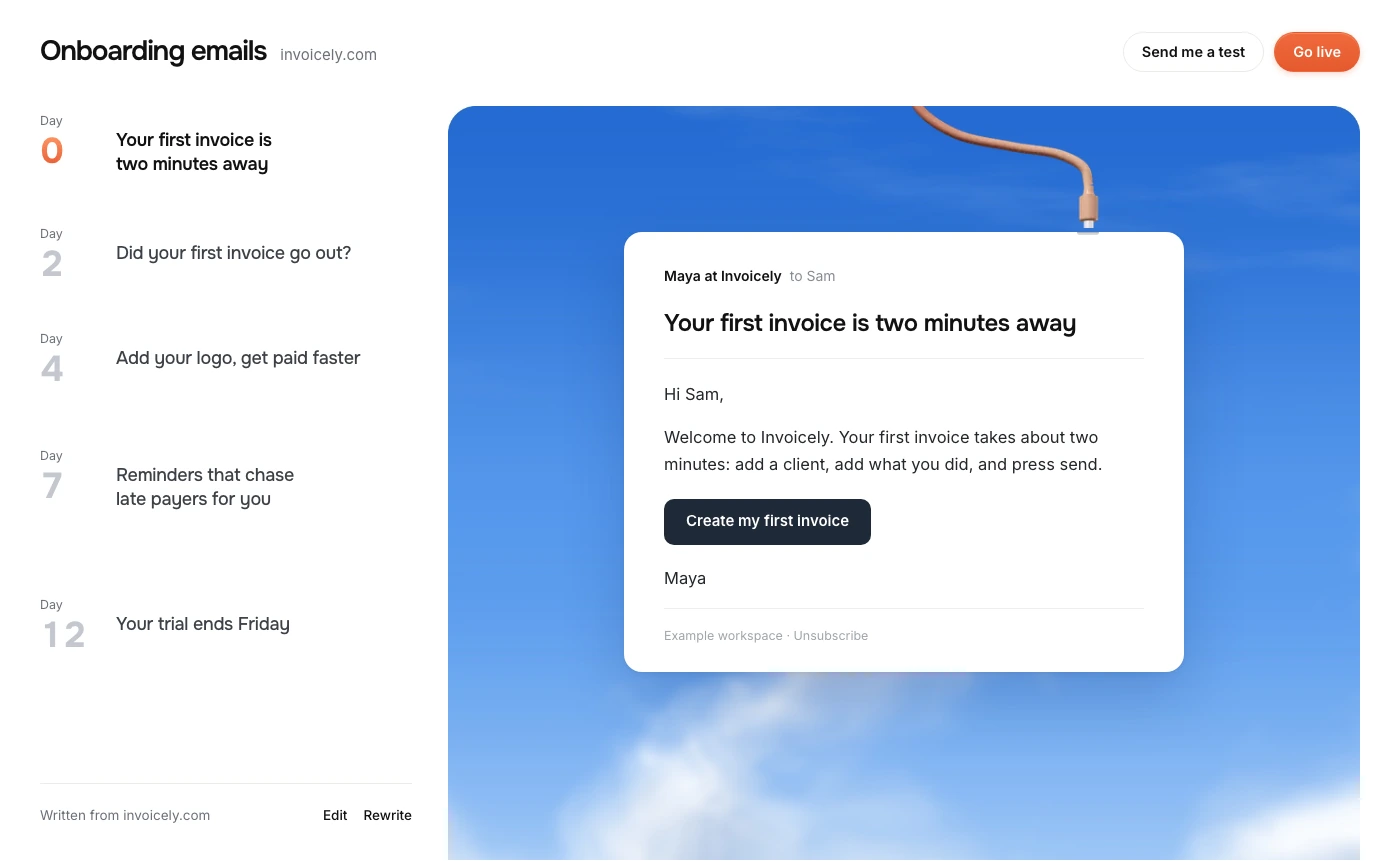
PennyPost’s free email generator can write an initial welcome and four follow-ups from your public app URL. Review the drafts for product accuracy, set the sending schedule, and connect your app’s signup and progress data. A public website cannot tell the generator whether Maya has completed a task inside her account. That information needs to come from your application.
Do the integration on your server. An API key embedded in browser JavaScript is visible to visitors. Check the response from each signup or progress update and log failures without recording sensitive message content.
Keep your early setup narrow. A welcome, one helpful reminder, and a working suppression rule are a useful first release. The other drafts can wait until their conditions are reliable.
Measure whether users reach the first result
The most useful first measure is how many eligible new accounts reach the outcome you defined. Decide the measurement window before comparing results. “Within seven days of signup” is a specific window. “Eventually activated” changes as accounts get older.
For example, suppose 80 eligible trial accounts start in a week and 24 send their first invoice within seven days. Your seven-day activation rate for that cohort is 24 divided by 80, or 30%. Those numbers are fictional. The calculation shows how to describe your own result consistently.
Track the time to that result as well. An email could help people complete setup sooner even if the eventual completion rate stays similar. Watch unsubscribe and complaint signals so you do not mistake additional sends for a better experience.
Email opens are less reliable evidence of progress. Apple’s Mail privacy settings can load remote content in the background, which makes a tracking-pixel load an uncertain signal that a person read a message. A recorded product action is more useful for deciding whether a setup reminder is still relevant.
If you test a change, change one important thing at a time. Compare the existing first-action link with a more direct link, or compare two explanations of the same setup obstacle. Changing the subject, schedule, and entire email together makes it harder to understand the result. Small signup counts also produce unstable percentages; read replies and watch real sessions while you gather enough observations.
Common mistakes in a first sequence
Teaching the whole product immediately
An email with eight feature links asks the reader to make another prioritization decision. Pick the action that helps them reach their first result and teach the rest after it becomes useful.
Sending from an address nobody reads
An invitation to reply creates a commitment. Use a monitored inbox, decide who handles replies, and remove promises you cannot keep. A small founder team can say that replies go to the team without pretending every answer comes directly from the founder.
Writing urgency before checking billing behavior
“Your account disappears tonight” is a serious claim. Match the email to what the app really does when the trial ends. Include the relevant date and timezone when timing matters, and test upgrades made shortly before a reminder is due.
Using templates without checking the links
A correct draft can still fail if its button opens a generic dashboard. Test each destination while logged out, while logged in, and with an expired session. After sign-in, the user should return to the intended task when your app supports that behavior.
Questions founders ask
How many onboarding emails should a SaaS send?
Use enough messages to support the important early actions without repeating yourself. Five message roles are a manageable planning exercise, not a universal optimum. A simple app may need fewer. A complicated product may need a longer sequence organized around distinct milestones.
How far apart should the emails be?
Base the delay on the time someone reasonably needs to attempt the task. The day 0, 2, 4, and 7 schedule in this guide is an example to test. A reminder should arrive after there has been a fair chance to act, and should disappear if the person already acted.
Can I use one sequence for free and paid users?
You can share messages that teach the same product actions. Separate messages that discuss trials, billing, plan limits, or features the recipient cannot access. Store the account’s current plan so those conditions stay accurate.
What should I build first?
Define the first useful result. Write the welcome and one reminder for people who have not reached it. Test the skip rule with two accounts before extending the sequence. Use the template library to turn that plan into drafts.